How I built a Slack bot for our lunch break
 by Damiano Giusti
Originally posted in MOLO17 Blog
We all know developers have a reputation for being lazy. I’m a developer, but honestly I don’t consider myself as lazy as the average developer is often made out to be. I like to optimize and automate repetitive tasks, and that always involves some hacky work to get things done. That said, I want you to know that the story I’m about to tell you is not about laziness… it’s about optimization 😎
The lunch time in MOLO17 #
At MOLO17, every day from 1PM to 2PM we enjoy our lunch break. We usually go to a pub in a town near the office. It offers a casual setting, a good selection of dishes, and the owner is an incredibly nice guy. A great place to enjoy a meal with the whole team!
The pub’s menu changes every day. On a daily basis, the owner – Renzo – shares a picture on Facebook and WhatsApp of a blackboard where he writes down the menu, so customers know what will be served for lunch.
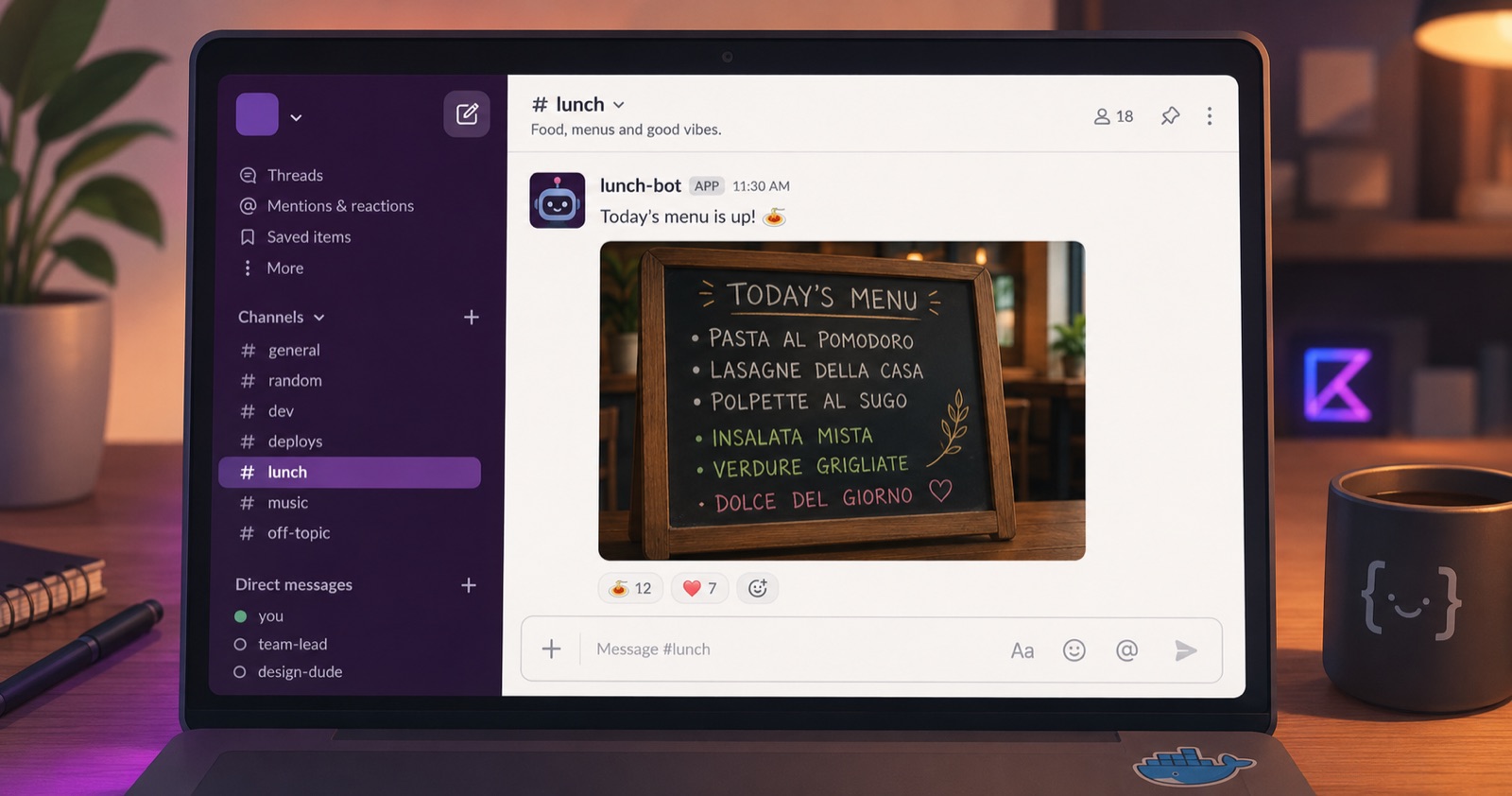
Every day, I would open his Facebook page and post the daily menu into our dedicated Slack channel (yes, we even have a #lunch channel).
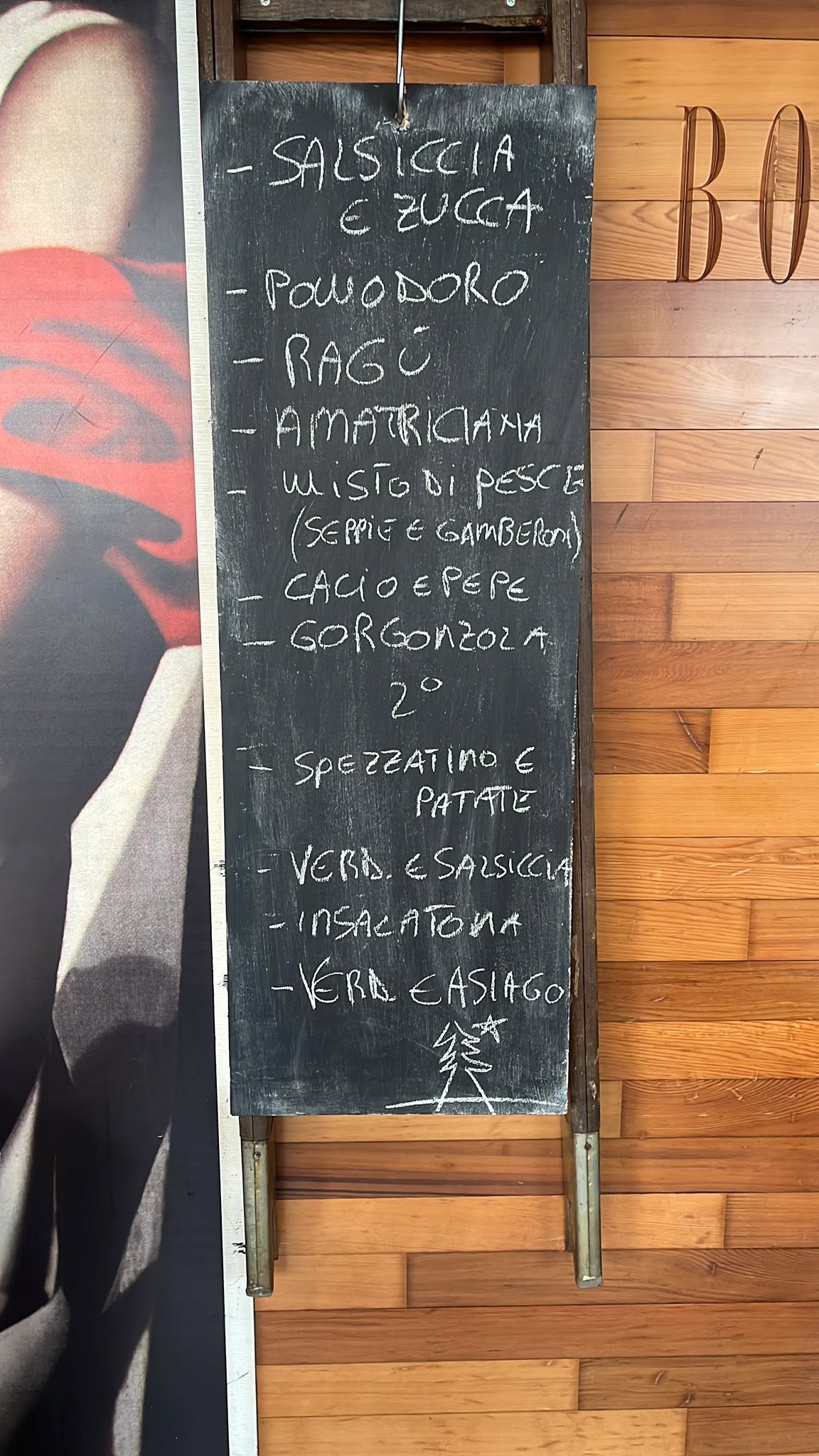
And here comes my laziness optimization-ness. The main “problem” with this routine was that I had to manually check every day, starting from 11AM, whether Renzo had uploaded the menu to his Facebook page. Since checking someone else’s Facebook page isn’t exactly my job, I started a fun weekend project to automate it.
Requirements #
What I needed was a Slack bot. The bot would check one of Renzo’s social pages and, if it found new menu pictures, post them to our #lunch Slack channel. The process would run every 5 minutes, between 11AM and 1PM — the window in which Renzo usually uploads the blackboard pics.
Quick feasibility studies #
Renzo uploads the menu pictures to his Facebook page, and often to his WhatsApp status too. So I explored how to integrate with one of these platforms to grab the freshly uploaded picture.
Naturally, I chose Kotlin to bring the idea to life.
WhatsApp #
I decided to start with WhatsApp. Although I knew the company doesn’t expose a public API, I wanted to explore its implementation a bit. At least I’d learn something new!
I started digging into how WhatsApp works under the hood. I found an interesting, well-documented project covering the reverse engineering of its chat protocol. So I started implementing my own version.
After an intensive Sunday afternoon, I managed to connect to the WebSocket that WhatsApp exposes and log in by rendering a QR code from a payload (just like the web version does), which I then scanned with my phone. It was a bit painful, due to the RSA key manipulation the WhatsApp client performs. Once logged in, I retrieved the ID and name of a few chats, just for testing purposes.
Digging deeper into the WebSocket events received when opening the user status page, I ended up dropping the idea of using this channel to get the pictures. All the media WhatsApp shares is (obviously) encrypted, and I would have needed further manipulation of the handshaked key pair to decrypt it.
That would have taken a lot of effort. I wanted something simpler and easier to maintain for a weekend project, so I shifted my focus to Facebook.
Facebook #
Facebook exposes certain data through a public API, called the Graph API. It can be accessed with a token obtained after logging in through a set of predefined UI components. Integrating those components into a mobile or web app is fairly simple. However, I needed to authenticate without a user interface, which doesn’t seem to be directly possible.
So I chose to read Facebook data by scraping it directly from the HTML. I used a handy tool called SeleniumHQ, meant for web page automation and testing. It’s a server that comes with drivers for almost all the popular languages. The Java one was my way to go.
A bit of structure #
Any software using the Selenium driver needs a Selenium server up and running. So I looked for a Docker image to set up my instance quickly, without worrying too much about infrastructure. In particular, I chose the StandaloneChrome image.
Docker #
I jotted down some ideas on how to organize the bot and settled on Docker Compose to orchestrate three containers, each with a specific purpose:
selenium: an instance of the SeleniumHQ server. It exposes port4444so drivers can connect;lunch-bot: a REST server written in Kotlin that exposes an endpoint to check the Facebook page for the blackboard pictures. It listens on port8080;cron: a simple Alpine Linux container that makes an HTTPGETcall tolunch-bot. The call is scheduled by a cron job to run every weekday from 11AM to 1PM.
Slack’s Incoming Webhooks #
To interact with Slack, I looked into Incoming Webhooks. They’re a simple API that lets you post messages (and more) to a Slack channel with a single HTTP POST request.
You configure a webhook to post to a specific channel in a specific workspace, and for each webhook Slack provides a dedicated URL to send the POST request to.
Firebase Remote Config #
To get Renzo’s pictures, Facebook obviously requires a logged-in browsing session. The most immediate way to obtain one was to inject my credentials into the HTML using SeleniumHQ and submit the form.
This would have worked, but it would have forced me to redeploy the Kotlin application just to change the Facebook credentials.
Firebase to the rescue!
I set up a project in the Firebase Dev Console and enabled the Remote Config feature. This way the bot can fetch the credentials on each run, and I can swap them at any time if needed.
I also added a fairly naive encryption scheme, just to avoid storing a plaintext password in the remote config.
With this setup in mind, I started writing the bot.
The Lunch bot #
The bot is a Kotlin REST server built with Ktor. It exposes a single endpoint that accepts an HTTP GET request.
Little architecture #
The architecture is fairly simple. There’s a main layer that holds the logic the bot needs to meet my requirements.
Then there’s a storage layer that persists a few values, like the last run timestamp and the identifier of the last picture retrieved. It’s an abstraction, so I can swap in a proper database later if I ever really need to (I’m using plain text files at the moment ¯\_(ツ)_/¯).
Finally, I added a small networking layer for the Slack communication, just to keep things clean.
I set up the Ktor server in the main method, along with the whole class hierarchy.
PS: I always apply Inversion of Control. Beyond the benefits it brings when testing, I find it a cleaner way to write code, decoupling class instantiation from usage. Honestly, you should use it too — even for simple projects!
Quick overview #
Thanks to Ktor, the REST entry point is a suspending lambda. When the GET handler is invoked, control passes to the LunchBot class, which holds the logic we need.
embeddedServer(Netty, port = 8080) {
  install(AutoHeadResponse)
  routing {
    get {
      val result = bot.start(this)
      ...
    }
  }
}.start(true)
The bot uses a Configuration class to fetch the Facebook credentials from Firebase Remote Config.
Then it reads the last execution timestamp from the storage layer. That timestamp is stored only when a run produces valid results. If the last successful run happened on the current day, execution is skipped.
Next, the bot uses a FacebookFacade class that wraps all the operations performed through SeleniumHQ. With it, the bot logs in with the given credentials by injecting them into the page’s text inputs and submitting the form.
For scraping, I use the mobile version of Facebook rather than the desktop one, for two main reasons. First, the desktop version is full of JavaScript magic, which makes reliable parsing hard. Second, Facebook has mechanisms to detect browsing behavior, so it can tell whether a visitor is a bot rather than a real person and block all the traffic. After some research I found this blog post where the author had run into the same problem (God bless the internet), and following their suggestion I switched the implementation to the mobile website.
Finally, the bot lands on Renzo’s photos page. It relies on the chronological order Facebook uses when displaying photos, from the most recent to the oldest. That way, if a picture appears before the last one retrieved, it must be new. Any image that wasn’t uploaded on the current day is discarded.
From the picture’s HTML, the bot extracts Facebook’s internal URI (like https://scontent-mrs2-1.xx.fbcdn.net/..) and posts it to Slack through the networking layer.
Conclusions #
This weekend project let me get to grips with a lot of concepts. I deepened my knowledge of building a REST server — something Ktor makes very straightforward — and sharpened my Docker skills. How cool is Docker? I have no doubt it has become a standard. Even mobile app developers like me can get servers up and running in no time.
As an improvement, I could use AutoML (Google’s brand-new machine-learning-as-a-service platform) to filter out pictures that don’t actually contain a blackboard. But honestly, that sounds a bit overkill 😛
I hope this gave you some inspiration to build something similar of your own! Thanks for reading!
Stay tuned: @damianogiusti – molo17.com